









| Type: | Free | Download | ||
| Version: | 2.0.4.0 (Zip) | Updated: | February 12, 2007 | Standalone file in Zip |
| Version: | 2.0.4.0 (MSIX) | Updated: | September 2018 | Microsoft Store Download |
Simulation Tool by TMurgent Technologies
TMnetsim is used to simulate a wide-area network for a single protocol. It is used to create test situations that simulate real-world situations in a reproducible way. TMnetsim works with TCP based socket protocols. The tool does not traffic secured with SSL. TMnetsim may be deployed on any PC with a Microsoft OS:
- A stand-alone PC
- the Client PC
- the Server PC
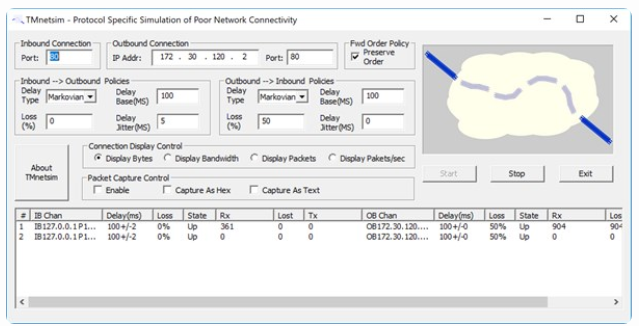
TMnetsim is primarily used to simulate network delay, however, in some (rare) cases it may be used to simulate packet loss or out-of-order delivery, as well as packet capture. Settings to control delivery delay and loss may be set on a global basis or per conversation basis. These parameters may also be set in a per-direction basis. A monitor allows you to view current conversations, and you may select specific instances to modify parameters for that connection on-the-fly.
When adding delay, there are several models of delay to choose from, a static value, or other randomized models that may better simulate the real world, such as Marckovian. Use very small values if you use packet loss. When this software originally written, a lot of network traffic ran over analog lines, which corrupted packets at a much higher rate than digital traffic (corrupted packets being dropped along the way). Many modern protocols can't handle such high loss very well.
TMnetsim works with most all TCP socket based protocols, including FTP, RDP, and ICA. To work with any arbitrary protocol all you need to know is the TCP Socket that the server listens to. Loss and out-of-order delivery will cause most TCP protocols to fail, so it should be used with caution. Only when the application protocol provides additional flow control or sequencing at a higher layer is use of Loss and OutOfOrder possible.
This is perennially our most downloaded software. It seems to be mostly used associated with some college classes downloading it each smester.
Note: The MSIX release of TMNetSim is the exact same binary verion of the product released in a MSIX package for Windows 10 (1809 and above) and Windows Server 2019 (and above).
When deployed on a stand-alone PC:
- Configure the Inbound Port to the port the server protocol under test normally listens to.
- Configure the Outbound IP Address to the address of the server.
- Configure the Outbound Port to be the port the server protocol under test listens to.
- The client program uses the normal port number, but should be directed to use this PC as the "server" to connect to.
When deployed on the Client:
- Configure the Inbound Port to be the port the server protocol under test normally listens to.
- Configure the Outbound IP Address to the address of the server.
- Configure the Outbound Port to be the port the server protocol under test listens to.
- The client program uses the normal port number, but should be directed to use itself (localhost or 127.0.0.1) as the "server" to connect to.
When deployed on the Server:
- Configure the Inbound Port to an unused port on the server. Often this can be one less or one more than the port that the protocol under test normally uses. You may use the cmd "netstat -p TCP" for a list of ports currently in use.
- Configure the Outbound IP Address to the address of the server (or 127.0.0.1)
- Configure the Outbound Port to be the port the server protocol under test listens to.
- Configure the client program to use the Inbound Port number instead of the normal port it uses.
Connection and Global Control settings are only read when the service engine is started via the start button. To modify parameters on a conversation without stopping the service (which would disconnect all conversations), double click on a conversation in the list and make parameter modifications in the dialog box that appears.
Common Port Numbers:
| 1490 | Citrix ICA Client Connections |
| 3389 | Microsoft RDP Client Connections |
| 80 | HTTP Traffic |
Other links: